
Share this tool:
 |
Description:
- Introduction
- Strong Features and Capabilities
- What AdCreative.ai Actually Is
- The Main Product Layers
- Workflow and Ease of Use
- Ad Creative Generation and Customization
- Product Photos, Fashion Shoots, and Ecommerce Assets
- Creative Scoring and Performance Prediction
- Competitor Insights AI
- Creative Insights, Refresh Alerts, and Account Connections
- AI Videos, UGC-Style Ads, and Newer Creative Formats
- Best Use Cases
- Practical Tips
- Limitations and Trade-Offs
- Final Takeaway
AdCreative.ai is an AI advertising platform for marketers, ecommerce brands, agencies, and small businesses that need more than a one-off image generator. It helps create ad creatives, product photos, product videos, UGC-style videos, ad copy, campaign variations, creative scores, competitor insights, and platform-ready assets from one workflow. The strongest reason to use it is not just that it can make attractive ads quickly. The stronger reason is that it connects generation with brand inputs, performance prediction, competitor research, and ad-platform context.
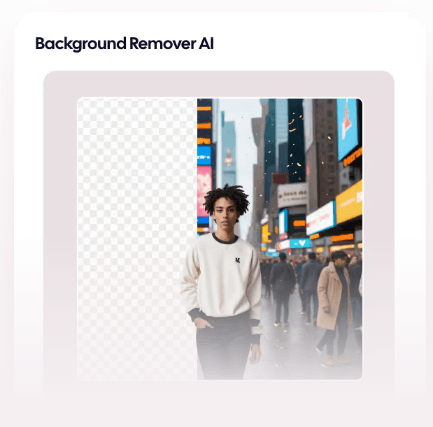
Generates conversion-focused static and visual ad creatives for social, search, and display platforms.
Turns product photos into ecommerce product photography, fashion shoots, product videos, and fashion videoshoots.
Scores ad creatives before launch and predicts which assets are more likely to perform.
Helps identify competitor ad creatives, traffic sources, landing pages, and historical patterns.
Generates ad texts and headlines, then supports language and tone adaptation for broader campaign use.
Lets users connect ad accounts and brand information so creative predictions and outputs are more tailored to the business.
The easiest way to understand AdCreative.ai is to think of it as an AI ad production workspace, not just an AI design tool.
A normal image generator can create a banner if you describe one well. AdCreative.ai is more focused on the actual paid advertising workflow: set up a brand, generate many ad variations, resize them for different channels, create copy, score the likely performance, use competitor insights for direction, and connect ad accounts so the system can learn more about your brand context. Its official site describes the platform as covering ad creatives, product photoshoots, competitor insights, creative scoring, product visuals, AI videos, and creative utility tools in one place.
That matters because paid ads are rarely about one perfect image. They are about variation. You need multiple hooks, formats, product angles, layouts, audiences, CTAs, and platform sizes. AdCreative.ai is built around that kind of campaign production rather than single-output design.
| Layer | What It Does | Why It Matters |
|---|---|---|
| Ad creative generation | Produces static ad creatives, banners, layouts, and platform-ready variations | Useful for fast paid social, display, and search campaign asset creation. |
| Product visual generation | Creates product photos, fashion visuals, product videos, and UGC-style video assets | Strong fit for ecommerce brands without constant studio production. |
| Copy generation | Creates ad texts and headlines using copywriting frameworks | Helps pair the visual with campaign messaging. |
| Creative scoring | Predicts creative performance and brand recall before launch | Useful for prioritizing which variations to test first. |
| Competitor insights | Analyzes competitor ads, traffic, landing pages, and historical windows | Helps marketers find strategic patterns before building campaigns. |
| Enterprise layer | Adds tailored AI models, commercial safety, governance, onboarding, APIs, and account management | More relevant for larger teams with legal, brand, and data requirements. |
This layered structure is why AdCreative.ai fits marketers better than casual designers. It is built around the question, “Which ads should we make, test, and refresh next?” rather than “Can I make a nice graphic?”
The basic workflow starts with a brand. AdCreative.ai defines brands as the foundation for creatives, where users can upload a logo, brand colors, brand descriptions, and connect ad accounts. That brand setup helps the system tailor creative designs and predictions to the business instead of generating disconnected visuals.
Once the brand is set, the tool becomes more useful. Users can generate many creative variations, adjust headlines, visuals, colors, layouts, and branding elements, and resize outputs for different ad platforms. The official ad creative page says AdCreative.ai can generate assets in required sizes and formats for social, search, and display channels, including Meta, Google, LinkedIn, and more.
This is one of the cleanest advantages over using a general AI image model plus a separate design tool. With AdCreative.ai, the work is already organized around campaign production. You are not starting from a blank canvas every time. You are generating ad-ready variations, editing them, scoring them, and moving toward launch.
The workflow is especially useful for people who need volume. A founder making one launch graphic may not need this much platform structure. A marketer testing five offers across three audiences and four platforms will understand the value much faster.
AdCreative.ai’s main product is still ad creative generation. The platform says it can create hundreds of AI ad creatives in seconds and automate design, layout, and messaging so teams can test more angles and move faster from idea to launch.
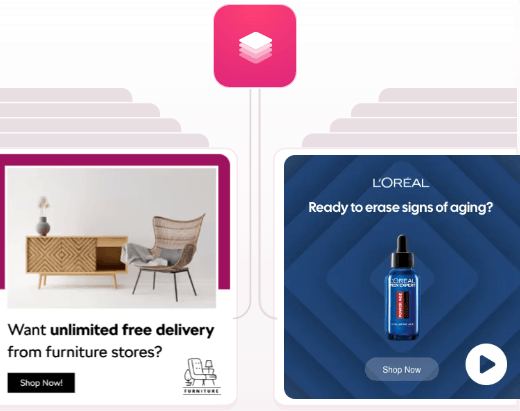
The important part is customization. AdCreative.ai says generated creatives can be adjusted across headlines, visuals, colors, layouts, and brand elements. That matters because AI ad tools often fail when they lock users into rigid templates. Good ads usually need small practical changes: different CTA text, a clearer offer, less crowded layout, a product close-up, stronger contrast, or a more direct benefit statement.
The output style is performance-marketing focused. That means bold layouts, clear hierarchy, readable offer text, product emphasis, and platform-ready sizing. It is less about artistic experimentation and more about generating assets that can plausibly go into a campaign.
AdCreative.ai is especially interesting for ecommerce because it goes beyond banners. The platform says it can transform simple product photos into studio-quality AI product photography for listings and ads, without expensive shoots or production delays.
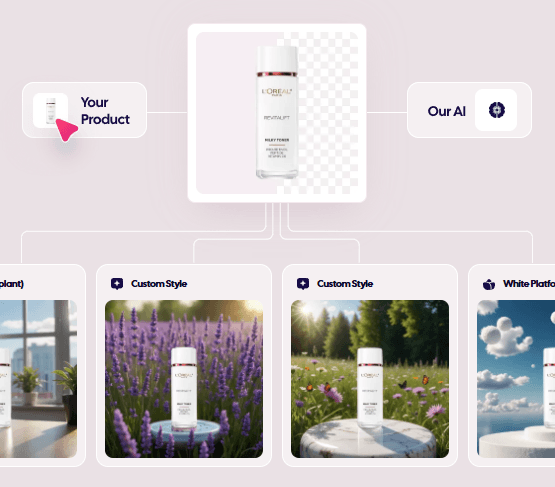
That is useful for brands that need visual variety but do not want to reshoot products constantly. A skincare bottle can be placed into different campaign scenes. A clothing product can be fitted onto AI-generated models through the fashion photoshoot workflow. A product photo can also become a product video or UGC-style video asset, depending on the selected tool.
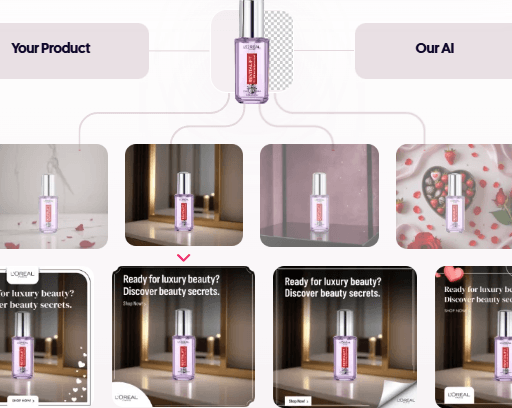
This is one of the strongest real-world use cases. Ecommerce brands often need more creative volume than they can afford to produce manually. Product pages, retargeting ads, seasonal campaigns, email banners, paid social, and marketplace content all need fresh assets. AdCreative.ai can help fill that gap quickly.
The limitation is that AI product visuals still need review. Details like packaging text, ingredient labels, proportions, product colors, and model fit should be checked before use. For simple product scenes, the workflow can be fast. For regulated products, luxury goods, or exact packshot requirements, human review is still important.
Creative Scoring AI is one of AdCreative.ai’s most important differentiators. The platform says users can upload ad creatives and receive predictions on which ads are more likely to deliver better performance and brand recall. AdCreative.ai also claims over 90% accuracy in performance prediction, which should be treated as the company’s own claim rather than an independent guarantee.
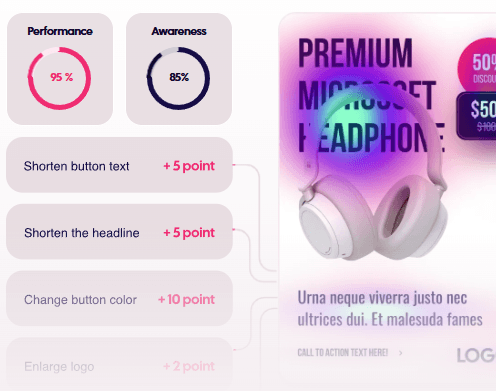
The practical value is prioritization. If you generate 40 ad variations, you still need a way to decide which ones to test first. Creative scoring can help marketers narrow the field before spending real budget.
That does not mean the score should replace testing. Paid media performance depends on audience, offer, timing, landing page, copy, placement, budget, and campaign setup. A high score may help choose better starting candidates, but it does not guarantee ROAS. The best use is to combine the score with real campaign testing.
Competitor Insights AI adds a research layer to the product. AdCreative.ai says the tool can discover competitors’ best-performing ad creatives across platforms, identify top-performing competitor ads, analyze cross-platform ad performance, and help marketers stay ahead with strategy.
The feature also goes beyond ad examples. The official page says it can predict competitor visitor counts, visitor demographics, top traffic channels, locations, and landing pages. It also supports PDF report generation and historical analysis with a date picker that can access data up to one year in the past.
This makes AdCreative.ai more useful for campaign planning. Instead of only asking, “What ad should we create?” you can look at what competitors appear to be running, what landing pages they use, what channels they lean on, and how their creative direction changes over time.
The best use is not copying competitors. It is pattern recognition. Look for repeated offers, visual styles, messaging angles, seasonal hooks, product framing, and audience assumptions. Then use those patterns to build your own campaigns with a sharper starting point.
AdCreative.ai also includes Creative Insights AI, which is designed to identify creative opportunities and warn users when an ad may need refreshing. The official Creative Insights page says the tool can help identify underperforming ads early and alert users to creative refresh opportunities.
This is useful because creative fatigue is one of the most common paid media problems. An ad can work well for a while, then decline as the audience sees it too often or the message stops feeling fresh. A tool that helps surface refresh opportunities can save time, especially for teams managing many campaigns.
The integrations matter here. AdCreative.ai says connecting ad accounts helps its model fine-tune creative designs and predictions to the brand. It also says connected ad accounts allow Creative Insights Pro to analyze creatives and provide insights such as average CTR in a brand category, best-performing colors, and best-performing creatives.
That means AdCreative.ai becomes more valuable when it has real campaign context. Without connected accounts, it is still a fast ad generator. With account data, it can become more of a performance-informed creative system.
AdCreative.ai’s current product lineup includes more video than older AI ad tools. Its site lists UGC Videos AI, AI Video Generation, Product Videoshoots, Storytelling Video, Blog Videos, Ad Videos, and Fashion Videoshoots. It also describes a workflow where users can upload an image and create video ads for use cases such as UGC-style content, product videos, stock visuals, and fashion clips.
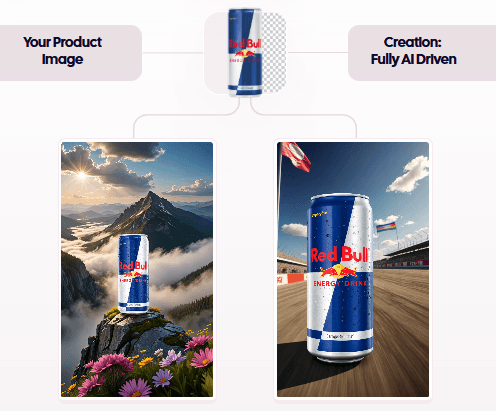
This matters because paid social has moved heavily toward short-form video. Static ads still matter, especially for retargeting, ecommerce, display, and simple offers. But many brands need motion, product demos, creator-style clips, and lightweight video variations.
AdCreative.ai is not the same thing as a full AI video editor or avatar production platform. Its video features are best understood as ad asset generators. They are useful for creating campaign-ready video variations quickly, not for building cinematic video narratives with deep timeline control.
- Ecommerce brands: AdCreative.ai is a strong fit for product ads, product photoshoots, fashion visuals, product videos, retargeting creatives, seasonal campaigns, and marketplace-style visual refreshes.
- Small businesses: The Starter plan is clearly positioned for small businesses, and the platform’s workflow can help teams without dedicated designers create campaign assets faster.
- Performance marketers: Creative scoring, competitor insights, ad account integrations, copy generation, and platform-ready resizing make it useful for people who need to test many variations quickly.
- Agencies: The Ultimate plan is positioned for agencies, and the brand/user structure makes more sense when managing multiple clients and campaign directions.
- Enterprise marketing teams: Enterprise features such as commercially safe AI models, global data governance protocols, personalized onboarding, AI fine-tuned with your own data, digital asset management API, and dedicated account management are more relevant for large organizations.
- Start by setting up the brand properly. Upload the logo, colors, descriptions, and connect ad accounts where appropriate. Better brand inputs should produce more usable outputs.
- Generate more than you need, then score and filter. Since credits are consumed on download rather than generation, use the generation stage for exploration and only download the strongest assets.
- Use competitor insights for strategy, not copying. Look for common patterns in offers, layouts, benefits, audience targeting, and landing pages, then adapt the insight to your own brand.
- Check product accuracy manually. AI product visuals are useful, but packaging, labels, proportions, colors, and regulatory details still need review before launch.
- Do not trust creative scores blindly. Use scoring to prioritize tests, not to skip testing completely.
- Use localization carefully. AdCreative.ai can adapt language and tone, but international ads still need cultural and legal review before spending budget.
- AdCreative.ai is not a full design suite. It can generate and customize ad creatives, but teams that need advanced layout control, complex brand systems, or unusual art direction may still need tools like Figma, Photoshop, Canva, or a professional designer.
- It is also not a guarantee of ad performance. The platform is built around conversion-focused generation and scoring, but ad results still depend on offer strength, targeting, audience fit, landing page quality, pricing, competition, and media buying skill.
- The credit system can also be a limitation for high-volume teams. Unlimited generation helps, but downloads consume credits, so marketers should plan which assets are worth exporting.
- Finally, the product is broad. That is useful, but it also means users should avoid trying every feature at once. The best entry point is usually one clear workflow: generate ads for one offer, create product visuals for one SKU, or analyze one competitor set. Then expand from there.
AdCreative.ai is strongest when you treat it as an AI ad production and performance workflow, not just a design generator. It helps marketers create ad creatives, product visuals, videos, UGC-style assets, copy, creative scores, competitor insights, and platform-ready campaign variations from one place.
The best fit is ecommerce brands, small businesses, agencies, and performance marketing teams that need more creative volume without building every asset manually. The main caveat is that AdCreative.ai can speed up creative production and prioritization, but it does not replace campaign judgment. The strongest results still come from good offers, clean brand inputs, human review, and real-world ad testing.
TAGS: Marketing Social Media Tools
Related Tools:

Analyzes websites to increase conversions and sales
Analyzes user behavior to enhance engagement

Improves website rankings and increase conversions

Analyzes images for enhancing online presence

Creates engaging bios for social media

Allows users to create precise models