

Share this tool:
 |
Description:
Sprite Studio is an AI sprite generator built around creating animated assets for 2D games. It combines AI generation with a sprite sheet editor, animation preview, frame controls, and asset library instead of generating a single piece of pixel art and leaving you to turn it into an animation elsewhere. That narrower focus is its main advantage. It feels less like a general image generator being repurposed for games and more like a small production workspace for developers who need characters and animations quickly.
Start by describing the character or object you want to create. You can also upload a reference image to guide the result toward an existing design. An Enhance Prompt option helps fill out the visual instructions if you don't want to write every detail yourself.
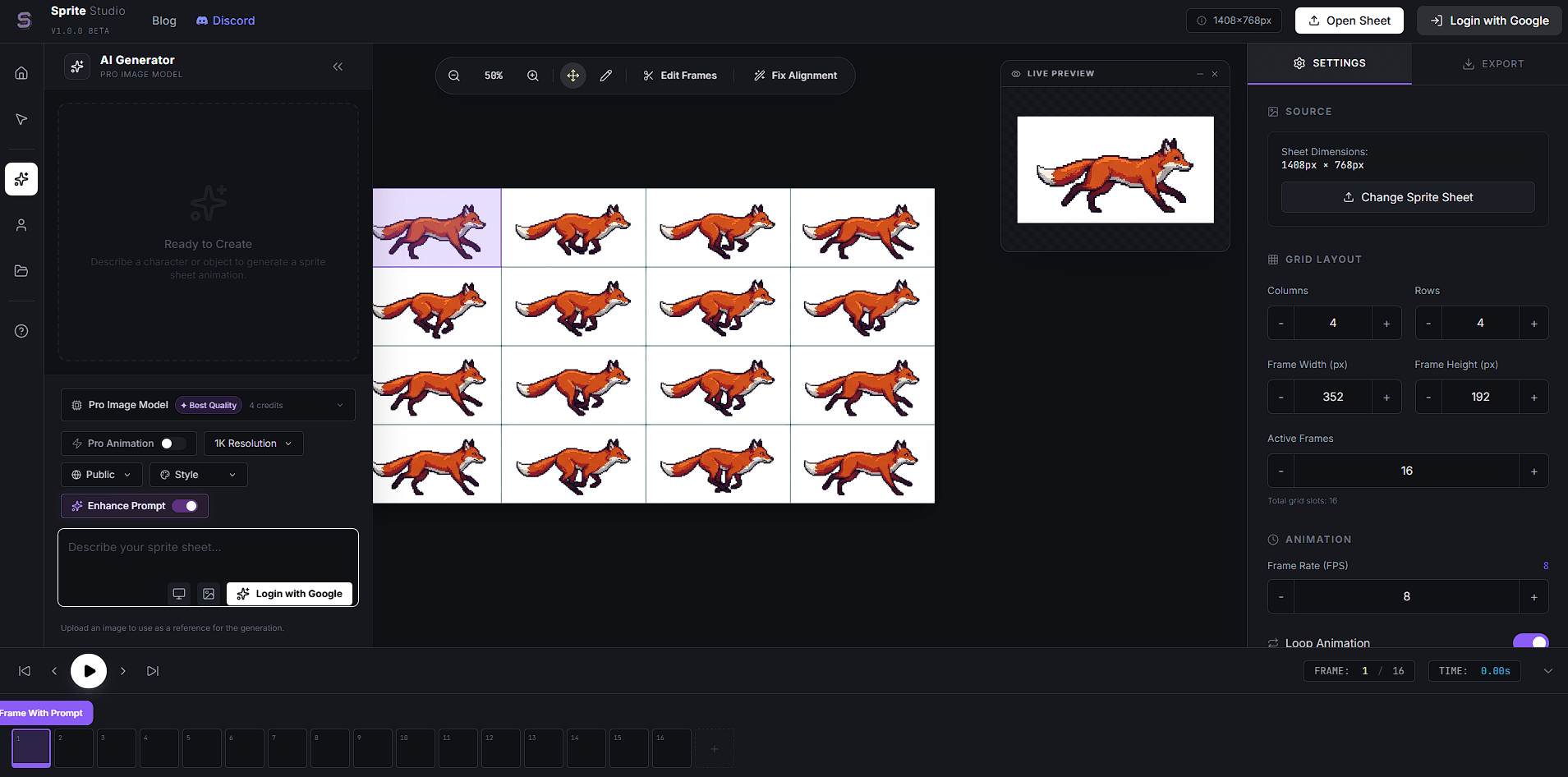
Once the asset is generated, you can check it in a live preview and configure the sprite sheet’s columns, rows, frame width, frame height, and number of active frames. FPS controls adjust playback speed, while looping lets you check repeating actions such as idle, walking, and running cycles.
The preview gives you an early answer to a practical question: does the character actually move well when the frames play together?
This changes the role of AI generation. You aren't only asking, "Can it draw my character?" You can also judge whether the frames work together as an animation.
Sprite animation prompts benefit from more direction than ordinary image prompts. A useful structure is:
| Prompt Element | What to Specify |
|---|---|
| Character | Appearance, clothing, equipment, proportions |
| Action | Idle, run, jump, attack, dodge, or another movement |
| View | Side view, front view, isometric, etc. |
| Motion | Speed, weight, exaggeration, secondary movement |
| Art Direction | Pixel art, fantasy, sci-fi, retro RPG, realistic game art |
| Consistency | Elements that should remain unchanged across frames |
The public gallery shows why this matters. One example uses a detailed boss-character prompt that defines clothing, physical proportions, movement, secondary motion from chains and armor, and the desired game-art treatment. The prompt describes not just what the boss looks like, but how its weight should affect each step.
That is a good model for Sprite Studio prompting. Describe motion as deliberately as appearance.
The interface separates Pro Image Model and Pro Animation, with the former positioned around image quality and the latter around animated output. The current generator also exposes style controls, reference-image input, prompt enhancement, and high-resolution generation options.
The distinction is useful because game development doesn't always require a full animation. A developer may need an environmental object or character concept first, then move into animation once the design is established.
Sprite Studio's own blog also points to NanoBanana Pro technology in its sprite-generation workflow, including guidance focused specifically on producing character jump animations.
AI sprite generators can produce attractive frames and still fail at animation. Small changes in proportions, equipment, silhouette, or position become obvious as soon as frames play in sequence.
Sprite Studio addresses part of that problem by keeping generation and inspection in the same interface. Individual frames are visible inside the grid, and the interface includes an Edit Frame With Prompt control. That gives the workflow more value than a basic text-to-image generator that exports a finished sheet and expects you to repair it somewhere else.
The live preview is equally important. Animation problems that are hard to notice in a static sheet become obvious once the sequence starts moving.
Generated work can be stored under My Library, with generated assets and asset groups available for organization.
That sounds minor, but it matters once a game has multiple characters, states, enemies, props, and animation variations. Sprite production becomes an asset-management problem surprisingly quickly.
There's also a community gallery. Examples surfaced by the site include a hero run cycle, isometric house, boss idle state, and side-scrolling elements, which suggests the platform isn't restricted to one narrow type of character animation.
Sprite Studio makes the most sense for indie developers, solo game creators, game-jam teams, and designers prototyping 2D concepts. It is particularly useful for creating character movement cycles, enemy and boss animations, early game-art concepts, side-scrolling assets, environmental objects, and rapid variations before committing time to manual pixel work.
It can also help non-artists communicate in a visual direction. A developer can generate a rough character and animation concept before handing the asset to an artist for cleanup or redesign.
Consistency is the main limitation. A well-drawn character will still look wrong in motion if its clothing, proportions, weapon, or silhouette changes between frames.
Complex actions are likely to need more iteration than simple idle or movement cycles. Generated assets need close inspection before production use, even when the initial result looks promising.
The editor provides grid and playback controls, but its scope is smaller than a full pixel-art application or game engine. Developers who need precise pixel-level cleanup or more extensive animation tools may still need a dedicated editor.
Sprite Studio is most interesting because it connects AI generation with the less glamorous parts of sprite production which includes frames, grids, timing, looping, previews, revisions, and asset organization.
Sprite Studio’s best audience are developers who want to move from an idea to a working 2D animation quickly, especially during prototyping and early asset production. The main caveat is consistency. AI can shorten the route to a usable sprite sheet, but demanding game assets still need human inspection and, in some cases, manual cleanup.
TAGS: Generative Art
Related Tools:

Provides interior design ideas

Generates and refines architectural designs

Creates optimized, high-converting video thumbnails

Turns text and reference images into highly stylized visuals
Creates unique artworks from texts
Creates visuals from text and images with pro-level accuracy