
Share this tool:
 |
Description:
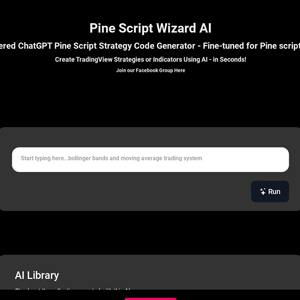
Pine Script Wizard AI is an AI code generator built for TradingView's Pine Script language. You just need to describe an indicator or trading strategy, and the tool will generate code that can be copied into TradingView's Pine Editor.
The narrow focus is its main appeal. General AI coding assistants can write Pine Script, but Pine Script Wizard AI is centered on this particular job: converting trading logic into indicators and strategies without requiring the user to write the code from scratch. Its public app also provides access to multiple AI model options and an Advanced Reasoning mode.
The basic workflow is straightforward. You describe the rules you want, let the AI generate Pine Script, then move the resulting code into TradingView to run and inspect it.
A request could be as simple as creating an indicator around a technical signal. More useful prompts define the actual trading logic: entry conditions, exits, stop-loss rules, take-profit behavior, indicator settings, and other constraints.
The public demo describes the product as capable of creating both TradingView strategies and indicators from AI-generated Pine Script, including for users without coding experience.
That last point needs some qualification. You don't necessarily need to know how to write Pine Script, but understanding trading logic still matters. AI can translate a bad rule into code just as easily as a sensible one.
Pine Script Wizard AI becomes more useful when the prompt reads like a trading specification rather than a vague idea.
For example:
Create a TradingView strategy that enters long when the 20-period EMA crosses above the 50-period EMA and RSI is below 70. Exit when the 20 EMA crosses below the 50 EMA. Include configurable EMA and RSI lengths.
This gives the generator concrete conditions and makes the resulting script easier to verify.
A good request should usually specify the script type, indicators involved, entry conditions, exit logic, adjustable inputs, and any chart behavior you need. If alerts, position rules, or visual plots matter, those should be stated too.
Pine Script Wizard AI's demo also shows that it can interpret more specialized concepts. One published example asks it to create a trading system based on a Fibonacci 61.8% breakout.
One distinction matters when using the tool: TradingView indicators and strategies serve different purposes.
An indicator calculates information and displays it on a chart. You might use Pine Script Wizard AI to combine moving averages, RSI conditions, trend filters, signals, labels, or custom visual logic.
A strategy adds trade-entry and exit rules that TradingView can evaluate through its strategy-testing tools.
For traders trying to formalize an idea, strategy generation is arguably the more interesting use case. It forces a loosely defined trading concept into explicit rules. "Buy when momentum looks strong" isn't enough. The script needs to know exactly what qualifies as strong momentum.
That process can expose missing pieces in the idea before any conclusions are drawn from a backtest.
The current Pine Script Wizard AI app lists several model choices, including Claude Sonnet, Claude Opus, and Grok options, alongside an Advanced Reasoning mode.
This matters more for complicated scripts than simple indicators. A basic moving-average crossover doesn't demand much reasoning. A strategy combining several indicators, time filters, trade-management rules, configurable parameters, and chart elements creates more opportunities for conflicting conditions or coding mistakes.
Having model choices also gives users another route when one generation doesn't handle a specification well. Still, changing models isn't a substitute for checking the generated Pine Script.
| User | Best Use |
|---|---|
| Non-programming traders | Turning defined trading rules into Pine Script |
| TradingView users | Building custom indicators and strategies |
| Strategy developers | Creating first drafts of scripts for further refinement |
| Technical traders | Combining multiple indicator conditions |
| Pine Script learners | Comparing plain-language logic with generated code |
| Experienced developers | Speeding up boilerplate and initial implementation |
The strongest fit is a trader who understands what they want the strategy to do but doesn't want to build every part manually.
AI-generated code should rarely be treated as finished just because it compiles.
A better workflow is to generate the first script, run it in TradingView, identify problems, and return with specific corrections. If an entry occurs at the wrong time, describe the intended behavior. If the script needs another filter, add it. If parameters should be configurable, request inputs instead of fixed values.
This iterative approach is especially useful because trading strategies contain two different problems: code correctness and strategy quality. A script can be valid Pine Script while implementing flawed trading logic.
The biggest limitation is that code generation isn't the same as strategy validation. Pine Script Wizard AI can help implement rules, but it cannot make those rules profitable.
Generated scripts also need review for logical errors, unsupported assumptions, repainting behavior, look-ahead issues, and conditions that don't behave as expected in live markets. Backtests bring their own risks, including overfitting and unrealistic assumptions about execution.
Complex prompts can create another problem. When too many indicators and exceptions are packed into one request, it becomes harder to determine whether the generated script represents the original idea correctly. Building the logic in stages is often safer.
Pine Script Wizard AI has a clear purpose: reduce the coding barrier between a trading idea and a working TradingView script.
It is most useful for traders who can define their rules but need help turning those rules into Pine Script, as well as developers who want a quicker starting point for indicators and strategies. The specialized workflow and multiple AI model options make it more focused than using a generic chatbot for the same task.
The main caveat is important. Generated code still needs testing and inspection, and a successful backtest doesn't prove that a strategy will perform the same way in live trading. Pine Script Wizard AI can shorten the path to implementation, but the trading logic and final decision remain the user's responsibility.
TAGS: Finance
Related Tools:

Helps businesses verify international trade compliance

Automates management of investment data

AI-powered investment research platform

Helps users understand cryptocurrency and trading strategies

Helps users organize tasks, set reminders, and sync lists

Facilitates project management and team collaboration