

Share this tool:
 |
Description:
Lucidpic is an AI image and video studio with a strong focus on believable people and character consistency. You can create a fictional person from scratch, build a reusable AI version of yourself from a photo, generate general imagery, edit existing photos, or animate an approved still into video. The current platform is broader than its earlier AI-person-generator identity, combining character tools with reference images, masking, retouching, background editing, product content, and several third-party image and video models inside one workspace.
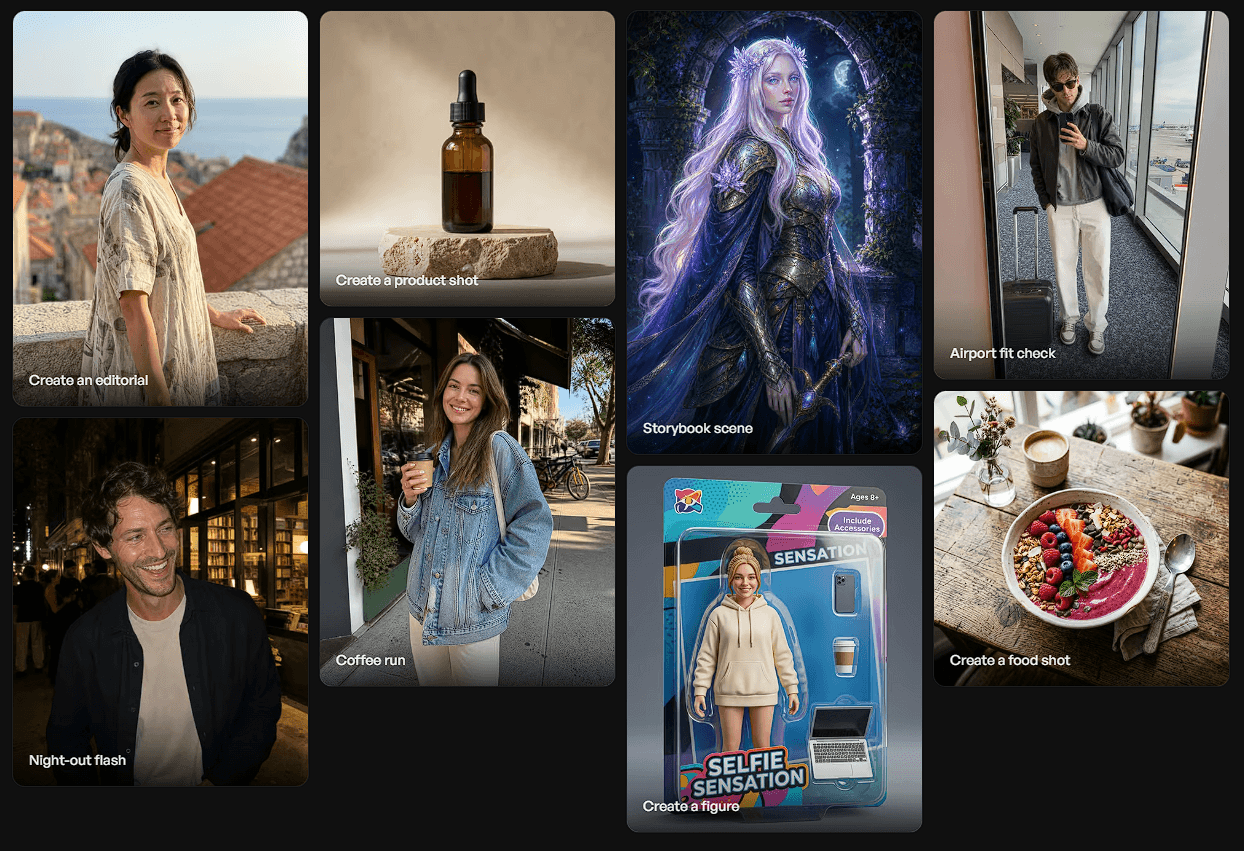
The most distinctive Lucidpic workflow is creating one recognizable person and reusing that identity across different scenes.
A character can appear in a studio portrait, café photo, fashion campaign, travel scene, or social post while keeping the same general facial identity. Lucidpic says its consistent-character system is designed to preserve defining features while allowing changes to clothing, pose, expression, environment, and framing.
You can either design a fictional character or create one from your own photo. The current upload flow can begin from a single clear face image, although the quality of the reference still matters.
That makes Lucidpic useful for projects where continuity matters more than producing one impressive portrait.
| Workflow | Best Use |
|---|---|
| Create Someone New | Virtual creators, fictional characters, campaigns |
| Create Yourself | Personal-brand photos and reusable self-images |
| Reference Images | Guiding identity, product, composition, or style |
| Full-Body Generation | Controlling pose, clothing, setting, and framing |
| Image Editor | Prompt-based changes to an existing image |
| Image to Video | Turning an approved still into a short motion clip |
A useful Lucidpic prompt needs more than appearance. Once the identity is established, the prompt should explain what kind of photograph you want.
For example:
“Candid smartphone photo of the character leaving a small bookstore at night, dark wool coat, direct flash, wet pavement, natural expression, slightly imperfect social-media photography.”
For an editorial image:
“Full-body fashion portrait on a windswept desert road at sunset, sculptural neutral tailoring, natural walking pose, warm backlight, editorial magazine photography.”
For branded UGC:
“Casual creator-style kitchen photo holding a skincare bottle toward the camera, bright morning window light, relaxed expression, realistic phone-camera texture.”
The distinction matters. A prompt such as “woman holding skincare” tells the system what objects to include. A stronger prompt explains pose, framing, camera feel, lighting, wardrobe, and purpose.
One of the biggest changes in Lucidpic is that it no longer depends on a single image-generation system.
The current model library lets users start with an Auto option or manually choose models based on the job. Lucidpic currently lists image options including Lucid Real, Nano Banana 2, GPT Image 2, Seedream 5.0 Pro, FLUX.2 variants, Ideogram 4, Recraft V4.1, Kling Image models, and Runway Gen-4 Image, among others.
That is useful because different jobs need different strengths. Lucid Real is positioned around realistic people and creator-style photography, while other models are better suited to text rendering, commercial artwork, reference-heavy editing, or more stylized concepts.
Lucidpic also supports compatible custom LoRAs with certain models, which gives experienced creators another route for maintaining a specialized visual style.
The first generation is not treated as the endpoint.
Lucidpic includes object removal, portrait retouching, automatic correction, background removal and replacement, outpainting, upscaling, reusable masks, cropping, resizing, and export tools. Edits are stored through a non-destructive history, so users can branch from an earlier result instead of continually overwriting the same image.
That is particularly useful for campaign work. If the face and composition are right but the background is wrong, there is less reason to regenerate the entire image and risk losing what already worked.
Lucidpic can also animate an existing image. You choose a generated or uploaded still, describe the desired subject movement, camera motion, atmosphere, and pacing, then generate a video using that image as the starting frame.
The current model hub includes several video systems, so Lucidpic functions more like a front end for comparing different motion models than a single proprietary video generator.
Starting from a finished image is a sensible workflow for character content because the still provides a stronger visual anchor than generating the entire scene and identity from text alone.
Lucidpic is especially useful for virtual influencers, personal brands, fashion and e-commerce content, UGC-style advertising, fictional characters, book promotion, social campaigns, and recurring brand personas.
It also works well when a content team needs many related images without repeating a physical photoshoot. One character can be reused across different clothing, locations, seasons, and campaign concepts.
Character consistency is improved, not absolute. Lucidpic itself advises treating variation and regeneration as part of the workflow. Identity can shift across challenging angles, expressions, or motion.
Video introduces another layer of instability. Faces, hands, text, product details, and backgrounds can change once movement is generated, so important frames need review.
The growing model selection is useful but can also make the platform less straightforward for users who want one predictable engine. Auto reduces that complexity, while advanced users will likely spend time learning which model suits each type of job.
Lucidpic is strongest as a consistent-person content studio rather than a basic AI portrait generator. Its real value comes from combining reusable characters with prompts, visual references, targeted editing, non-destructive history, multiple image models, and image-to-video generation.
It is best for creators and brands that need the same recognizable person across many pieces of content. The main caveat is that consistency still requires good references, selective regeneration, and careful review, especially once complex poses or video motion enter the workflow.
TAGS: Generative Art
Related Tools:
Transforms text prompts into unique, personalized coloring pages
Generates unique artworks from prompts

Generates human models and product images

Creates visuals from text and images with pro-level accuracy
Generates high-quality images

AI tool for animating paintings