
Share this tool:
 |
Description:
Iconly is an AI design platform built around icons, but its scope goes well beyond generating small graphics. The platform combines an AI Icon Generator, Vector Studio, Social Graphics Studio, Email Builder, and Brand Studio. The useful idea here is connection because you can create an icon, adapt it to a brand, reuse it in marketing graphics, organize assets, and even deploy icons to a website without jumping between several unrelated tools.
Icon generation remains the most developed part of the platform. You describe an icon in plain English, choose a visual style, and generate the asset. Iconly supports more than 20 built-in styles and custom templates, covering approaches such as line art, solid glyphs, outlines, pixel art, and isometric graphics.
The stronger feature is what happens after the first result. You can attach an existing generation and ask the AI to refine it, or use an icon as a visual reference for another generation. That makes it easier to build a related set rather than generating isolated icons that don't look like they belong together.
Custom style templates push this further. A team can define a reusable visual direction, including color mode, detail level, output size, and automatic post-processing. For product design, where ten matching icons are usually more useful than one impressive icon, that consistency matters.
Iconly doesn't expect AI generation to produce the finished asset every time. The browser editor provides tools for recoloring, adjusting stroke thickness, smoothing edges, cropping and recentering, removing backgrounds, and cleaning unwanted details with an eraser.
These aren't glamorous features, but they're practical. If an icon has the right concept but the line weight doesn't match the rest of an interface, regenerating it from scratch is inefficient. Adjusting the thickness is faster.
That editing layer is one of Iconly's more useful distinctions from basic text-to-icon generators.
Vector Studio generates SVG illustrations from text and includes node-level editing. Users can move nodes and Bezier handles, add points, change fills and strokes, adjust line width, and transform vector elements. The result can then be exported as scalable SVG.
This is useful for web designers and developers. Raster icons work for many projects, but editable vectors are easier to resize, recolor, modify, and incorporate into a larger design system.
It also provides a useful escape hatch from AI imperfections. Instead of repeatedly prompting to correct a slightly wrong curve, you can edit the path yourself.
Brand Studio is one of the features that makes Iconly feel more like a design platform. It can crawl a website and extract elements such as colors, fonts, and visual identity information. That brand profile can then be used across other Iconly tools.
A practical workflow might start with an existing website, extract its brand direction, generate matching icons, then use those assets inside social graphics.
This won't replace a full brand identity process. It is better viewed as a way to keep AI-generated assets from drifting away from an established visual system.
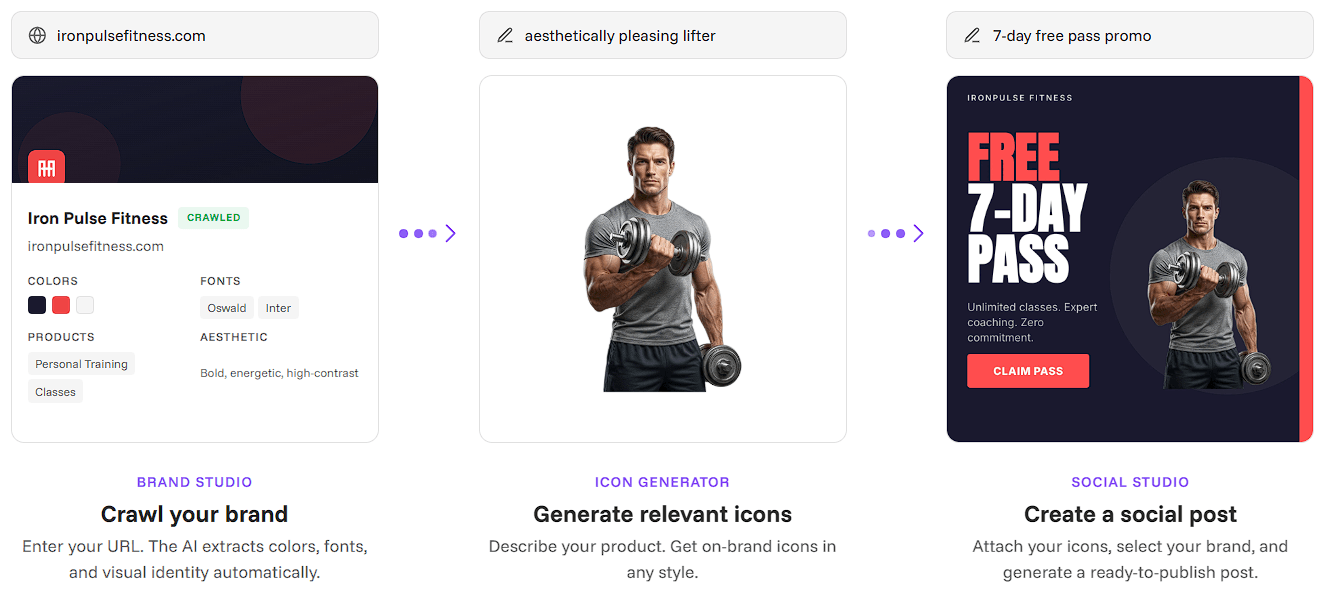
Iconly also extends generated assets into marketing production. Social Graphics Studio can combine icons with AI-generated copy and layouts for formats such as feed posts, square graphics, and stories. Its editor supports repositioning elements, inline text changes, typography and color adjustments, brand colors, and multiple output formats.
The Email Builder takes a similar approach to responsive HTML email. Users can edit content visually, adjust design properties, insert merge variables, update links, preview different widths, and export HTML for use with external email platforms.
Neither feature needs to replace a dedicated design or email platform to be useful. Their advantage is speed when the assets already live inside Iconly.
Iconly becomes more interesting for developers through its REST API. Icon generation, social creatives, email templates, post-processing, and library management can be integrated into other applications or automated workflows. Generated icons can also be stored in a library and delivered through Iconly's CDN.
There is also an MCP server for connecting Iconly's tools with compatible AI assistants, plus downloadable skills for coding agents. This gives developers another route to generate and manage design assets without relying entirely on the browser interface.
| Use Case | Why Iconly Fits |
|---|---|
| App and web UI | Generate and normalize related icon sets |
| Design systems | Reusable styles help maintain visual consistency |
| Indie products | Combines several small design tasks in one platform |
| Brand assets | Brand Studio carries colors and identity across tools |
| Developer workflows | API, CDN, and MCP support automation |
| Marketing graphics | Icons can move directly into social creatives |
| Custom vectors | SVG generation includes manual node editing |
Iconly's breadth is both a strength and a limitation. A platform covering icons, vectors, social graphics, email, and branding won't necessarily provide the depth of a specialist application in every category.
AI-generated assets can also need cleanup, especially when a design system requires strict geometric consistency. Reference modes, normalization, templates, and editing controls help, but teams should still inspect related assets as a set rather than assuming AI generations will match perfectly.
Export options also vary by workflow. Icon generation centers on PNG output and CDN deployment, while Vector Studio is the more appropriate route when editable SVG is required.
Iconly is most useful when you need more than a one-off AI icon. Its stronger workflow connects generation with refinement, reusable styles, vector editing, brand context, asset management, marketing design, and developer deployment.
That makes it a good fit for app developers, web designers, indie makers, and small creative teams building a consistent family of assets. The main caveat is specialization. Dedicated vector, branding, or email tools can offer deeper control, but Iconly's advantage is putting those related jobs into one connected AI design workflow.
TAGS: Generative Art
Related Tools:

Transforms photos to cartoon images

Generates outfit combinations

Offers interior design ideas
Predicts how a person's face might age over time

Generates artistic content

AI-powered photo editing toolkit