
Share this tool:
 |
Description:
Claude Code is an agentic coding tool from Anthropic built for real development work across your actual project, not just single-file suggestions. It can read your codebase, edit files, run commands, and work across the terminal, IDE, desktop app, and browser, which makes it useful for understanding projects, fixing bugs, refactoring, writing tests, and handling multi-step coding workflows.
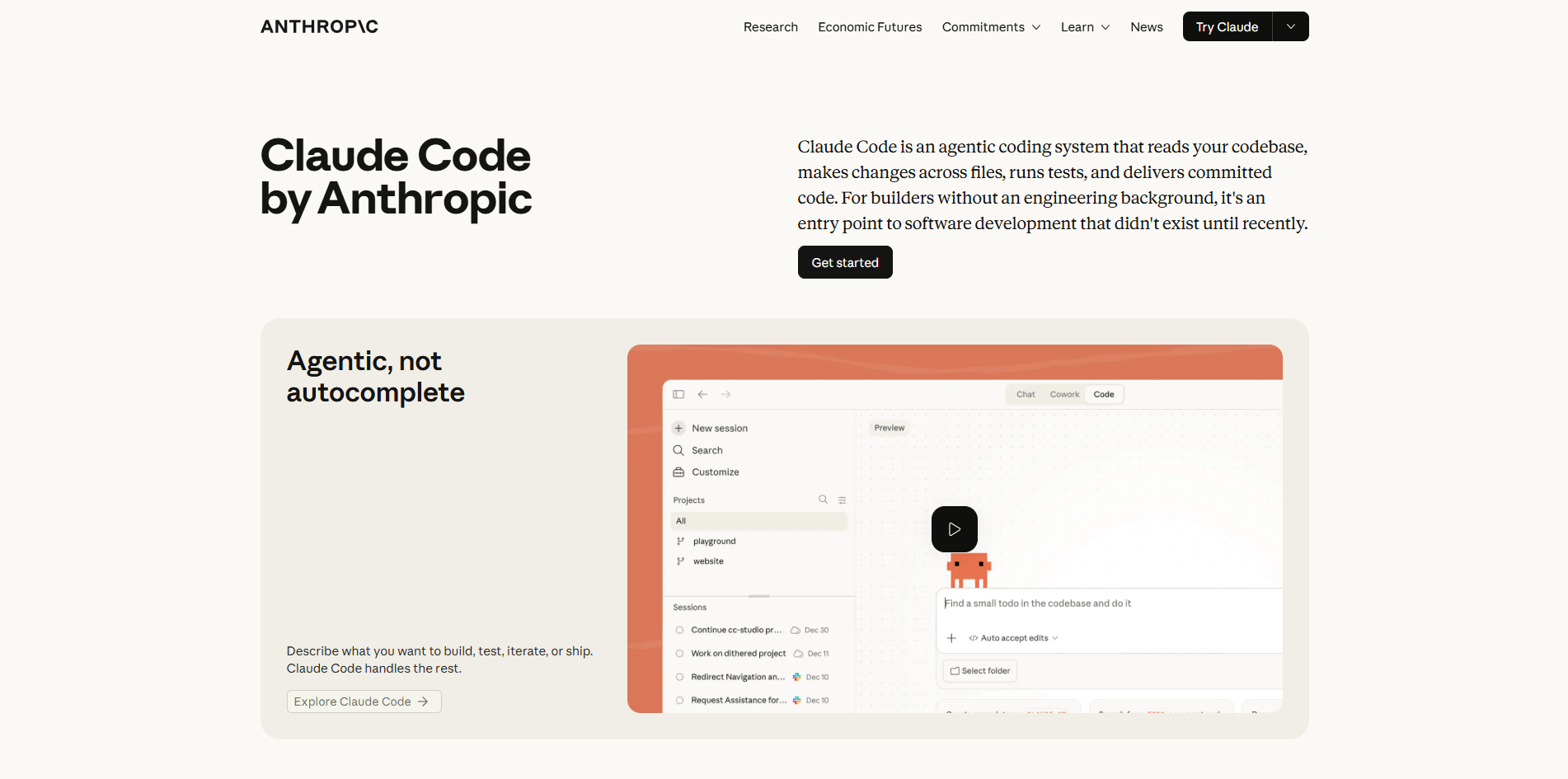
The interface matters here because Claude Code is meant to operate as a project-level coding agent, not just a chat box for isolated code snippets.
Claude Code can read a codebase, edit files, run commands, and work across multiple tools instead of staying limited to inline suggestions.
It is built for tasks like codebase exploration, debugging, refactoring, test writing, and PR preparation across many files in one session.
Claude Code supports hooks, MCP integrations, and skills so it can plug into external tools and automate parts of the development workflow.
Anthropic documents built-in support for subagents, and introduced agent teams in research preview for read-heavy parallel work like codebase reviews.
Anthropic positions the Claude 4 model family, especially Opus 4 and Sonnet 4, as stronger on coding, long-running tasks, and agent workflows.
Claude Code can be paired with testing, monitoring, permissions, and usage telemetry, which makes it more practical for real team workflows than a simple chat-only coding assistant.
Understand an unfamiliar codebase
Before using this prompt: Open Claude Code inside the project you want reviewed.
Prompt:
“I’m taking over this project and I haven’t worked on it before. Please explore the codebase and give me a quick summary of the main purpose of the project, which folders and files handle the core logic, any architecture or coding patterns I should know about, and where I should start if I need to make changes safely.”
Why this is useful: This works well as a first-step onboarding prompt when you inherit a repo.
Trace a production bug
Before using this prompt: Paste the real error message and stack trace, and make sure Claude Code is opened in the correct project.
Prompt:
“I’m seeing this error in production: [paste error message and stack trace]. Please trace where this is happening in the codebase, explain the root cause, identify which files are involved, suggest a fix, and check whether anything related could also break because of this issue.”
Why this is useful: This gives Claude Code the exact debugging target instead of asking it to guess.
Refactor a messy module
Before using this prompt: Tell Claude Code which module, file, or folder you want refactored. Replace the placeholder with the actual file path or module name.
Prompt:
“The module at [insert file path or module name] has gotten messy over time. Please identify duplicated logic, extract repeated patterns into shared functions where appropriate, improve readability, keep the existing functionality exactly the same, and then show me what changed and why.”
Why this is useful: Naming the exact module removes ambiguity and makes the prompt immediately usable.
Write tests in the project’s existing style
Before using this prompt: Specify the exact function, method, class, or file that needs tests. Replace the placeholder with the real name or path.
Prompt:
“The function [insert function name] in [insert file path] does not have tests yet. Please write comprehensive unit tests for it, cover the main success cases, edge cases, and error conditions, and match the testing style, framework, and syntax already used in this codebase.”
Why this is useful: This makes it clear what Claude Code should test and what conventions it should follow.
Implement a new feature across multiple files
Before using this prompt: Describe the feature clearly and mention the existing module, route, component, or service it should connect to.
Prompt:
“I need to add a new feature: [describe the feature clearly]. It should integrate with [insert existing module, component, route, or service], follow the existing patterns already used in this codebase, include any required database, config, or API changes, and add tests for the new behavior. Please make the changes across all affected files and summarize what you changed.”
Why this is useful: This gives Claude Code both the new requirement and the existing system it must fit into.
Automate repetitive repo-wide changes
Before using this prompt: Provide one real example of the old format and one real example of the new format.
Prompt:
“I need to update all API calls across this project from the old format to the new format. Old format: [insert example]. New format: [insert example]. Please apply this change consistently across all relevant files, avoid changing unrelated code, and list every file that was modified.”
Why this is useful: This works best when the old and new patterns are concrete and easy to verify.
Prepare PR-ready changes
Before using this prompt: Run this after Claude Code has already made or reviewed your changes in the current branch.
Prompt:
“I’ve finished this feature in the current branch. Before I commit, please review the changed files for obvious bugs, check whether the test coverage looks reasonable, confirm whether the code style matches the rest of the project, and write a clear PR description summarizing what changed and why.”
Why this is useful: This is stronger when used at the end of a task, not at the beginning.
Automate post-edit workflow
Before using this prompt: Make sure your project already has a known formatter and test command, or specify them in the prompt.
Prompt:
“After each code edit in this project, run the formatter using [insert formatter command] and then run tests using [insert test command]. If formatting or tests fail, tell me what failed and do not treat the task as complete.”
Why this is useful: This avoids assuming Claude Code already knows which commands your project uses.
Use external tools and documentation
Before using this prompt: Connect the relevant MCP tools first, such as documentation, issue tracker, or internal knowledge tools.
Prompt:
“Use the connected MCP tools to review the current documentation and related issues for [insert feature or task]. Then update the implementation in this project so it matches the current spec, and list any open issues or missing requirements I should know about.”
Why this is useful: This tells the reader that the prompt depends on MCP being connected first.
Split a large read-heavy task
Before using this prompt: Use this for large repos or broad review tasks where parallel analysis is helpful.
Prompt:
“Review this codebase in parallel. One agent should map the architecture, one should identify testing gaps, and one should flag risky refactor areas. Then combine the findings into one clear action plan with priorities.”
Why this is useful: This is clearer about when and why to use a parallel workflow.
- Picking up an unfamiliar codebase: Strong for onboarding into projects you did not write yourself.
- Tracing bugs across multiple files: Useful when the issue spans modules, services, or layers of the app.
- Refactoring old or duplicated code: Good for cleanup work that needs repo-wide awareness instead of single-file edits.
- Adding features across a real project: Strong when implementation touches routes, components, services, config, and tests together.
- Writing tests in the project’s existing style: Better when you want new tests to match the framework and conventions already in the repo.
- Handling repetitive repo-wide changes: Useful for consistent updates like API migrations, naming changes, or shared pattern replacements.
- Preparing cleaner pull requests and review summaries: Helps with final QA-style review, PR descriptions, and change summaries before shipping.
These are closely aligned with Anthropic’s own documented Claude Code workflows.
- Give stack context early: A quick line like “This is a Django project using PostgreSQL and pytest” helps Claude Code orient faster.
- State boundaries clearly: Tell it what should not change, what patterns to follow, and whether it must preserve existing functionality.
- Ask for verification in the same prompt: Include test-running or review steps so the task ends with feedback, not just edits.
- Use version control as protection: Claude Code is powerful enough that it is worth committing a clean baseline before large changes.
- Break big tasks into steps: Very large scopes still work better when split into smaller, reviewable chunks.
- Use hooks, skills, or MCP when relevant: These are some of the clearest ways to get more than standard code-generation value from Claude Code.
- Business logic still needs human judgment: Claude Code can understand code structure well, but product rules, compliance, and business decisions still need a person.
- Large codebases may need narrower scope: Context and task quality are usually better when very large repos are handled in focused chunks rather than one huge request.
- Security-sensitive code requires review: Authentication, authorization, secrets, and user-data handling should always be checked by a human.
- Architecture choices are still your call: Claude Code can propose options, but system design decisions should not be delegated blindly.
- Performance work still needs profiling: Clean code generation is not the same as careful optimization on real bottlenecks.
Claude Code is best understood as a coding agent rather than a coding autocomplete tool. It is strongest when the task involves understanding a repo, editing across multiple files, running commands, following project conventions, and helping with real workflow steps like testing, review, and automation. Anthropic’s own docs position it exactly in that project-level, agentic layer.
For practical day-to-day development, that makes it genuinely useful. It will not replace human judgment on architecture, business logic, or security review, but paired with code review, tests, and version control, it can remove a lot of repetitive work and speed up the parts of software development that usually take the most time.
TAGS: Programming
Related Tools:

Simplifies API development with reusable modules

Enhances code quality by detecting and fixing issues

Simplify the creation and management of data-driven applications

Analyzes code in real time to improve quality

Enhances data analysis and decision-making
Transforms plain-text app ideas into visual backends